The "Lock and Key" of Kubernetes Scheduling
A deep dive into Kubernetes scheduling mechanics, showing how Taints, Tolerations, and Node Affinity establish the ultimate placement handshake for production clusters.
As I’ve been scaling my knowledge in Kubernetes, I realized that letting the Scheduler decide where Pods land "by default" isn't enough for production-grade clusters. To build resilient, secure, and cost-efficient systems, you need to actively design the placement logic.
Here is a deep dive into the "Lock and Key" mechanisms of Kubernetes scheduling: Taints, Tolerations, and Node Affinity, and how they work together to orchestrate workloads.
The Visual Guide to Scheduling Logic
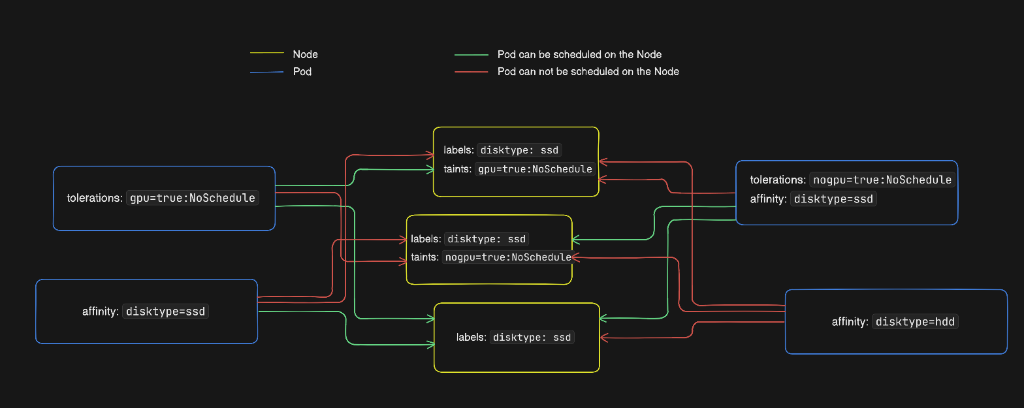
To help conceptualize how Pods evaluate Node taints and affinity constraints, I mapped out the logical pathways:
---
The Handshake: Taints, Tolerations, and Node Affinity
Think of Kubernetes scheduling as a two-way handshake between your Nodes (which host the workloads) and your Pods (the workloads themselves).
🛑 Taints (The Node's Choice)
A Node uses a Taint to say: "I am restricted. Keep away unless you have a specific permit."Taints are applied directly to Nodes and repel any Pods that do not explicitly tolerate them. They are defined by a key, a value, and an effect (such as NoSchedule, PreferNoSchedule, or NoExecute).
NoExecute, any running Pods on it without a matching toleration will be evicted immediately.Example: Reserving high-performance GPU nodes for resource-intensive NestJS backend processing while keeping general traffic away.
🔑 Tolerations (The Pod's Pass)
A Pod uses a Toleration to say: "I have the pass; I'm allowed to stay on that restricted Node."Tolerations are defined in the Pod spec.
[!IMPORTANT]
Crucial Finding: Having a toleration does not force a Pod to schedule on a tainted node. It simply removes the repulsion. The Pod is still free to land on a general-purpose node if the scheduler deems it a better fit!
Here is how a Toleration looks in a Pod specification:
apiVersion: v1
kind: Pod
metadata:
  name: auth-service
spec:
  containers:
  - name: nestjs-api
    image: nestjs-api:latest
  tolerations:
  - key: "gpu"
    operator: "Equal"
    value: "true"
    effect: "NoSchedule"
🧲 Node Affinity (The Pod's Preference)
Unlike Taints, Node Affinity is "Pod-centric." The Pod says: "I want to be on a node with an SSD," or "I must run in a specific Availability Zone."Node Affinity allows you to constrain which nodes your Pod is eligible to be scheduled on, based on labels on the node. There are two types:
1. Hard Affinity (requiredDuringSchedulingIgnoredDuringExecution): The scheduler must find a node that matches the rule. If none is found, the Pod remains pending.
2. Soft Affinity (preferredDuringSchedulingIgnoredDuringExecution): The scheduler will try to find a matching node. If none is found, it will still schedule the Pod on another node to maintain availability.
spec:
  affinity:
    nodeAffinity:
      requiredDuringSchedulingIgnoredDuringExecution:
        nodeSelectorTerms:
        - matchExpressions:
          - key: disktype
            operator: In
            values:
            - ssd
---
Why This Matters for Production (e.g., AWS EKS)
Designing placement logic is a day-one requirement for enterprise production environments:
1. Cost Optimization: Use Node Affinity to keep non-critical "Dev" workloads strictly on cheaper EC2 Spot Instances, while pinning core databases or production APIs to On-Demand instances. 2. Security & Compliance: Use Taints to ensure sensitive data processing workloads (like HIPAA-compliant Healthcare data) stay isolated on dedicated, hardened nodes with specialized encryption profiles. 3. Latency Mitigation: Use Affinity rules to ensure your Next.js frontend and NestJS API pods are scheduled within the same AWS Availability Zone (AZ) to eliminate cross-AZ latency fees and speed up round-trip network performance.
---
💡 Pro-Tip: The Ultimate Priority Rule
If a Node has an SSD label but is Tainted, and your Pod has SSD Affinity but NO Toleration—the Taint wins.
In Kubernetes scheduling, security boundaries (Taints) always override placement preferences (Affinity). A Pod must first be allowed to enter the node (Toleration) before its preference for that node (Affinity) can be evaluated.
Testing these behaviors in a local multi-node kind (Kubernetes in Docker) cluster is an excellent way to see the Scheduler filter, prioritize, and bind Pods in real time!